Wednesday, April 15, 2015

Customer Relationship Management Software

Reflect CRM Software for both Mac and Windows enables a business to easily manage customer relationships and databases. In addition, improve client relationships by taking notes, tracking interactions, tasks and upcoming events. 

By utiliziing this free customer database software, you will build a stronger relationship with your clients. 


  • Improve customer loyalty and retention
  • Increase ROI on marketing campaigns with better targeting
  • Improve cross-selling and up-selling success

CRM Customer Software consolidates customer information across an organization to help increase customer satisfaction and loyalty. This gives businesses more complete insight into their clients and customers, and helps front-line employees make faster, better informed decisions.
We hope you enjoy the free Reflect Customer Database Software and encourage you to also try our other business software to help your company grow. 
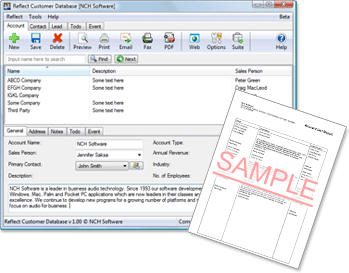
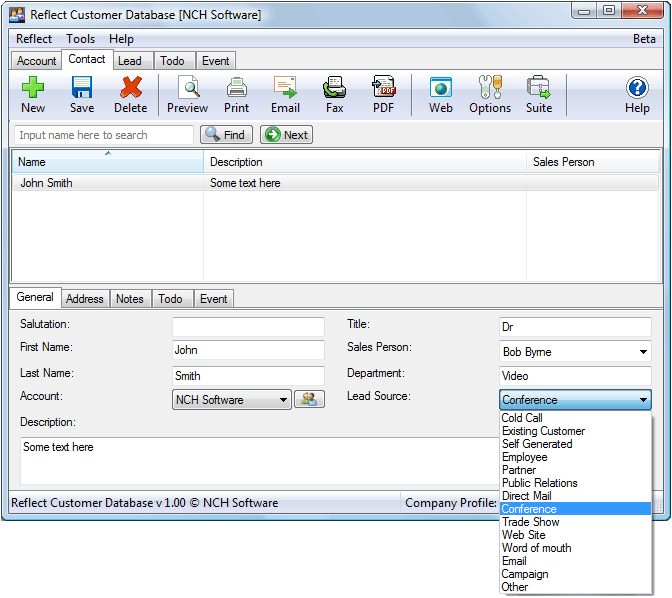
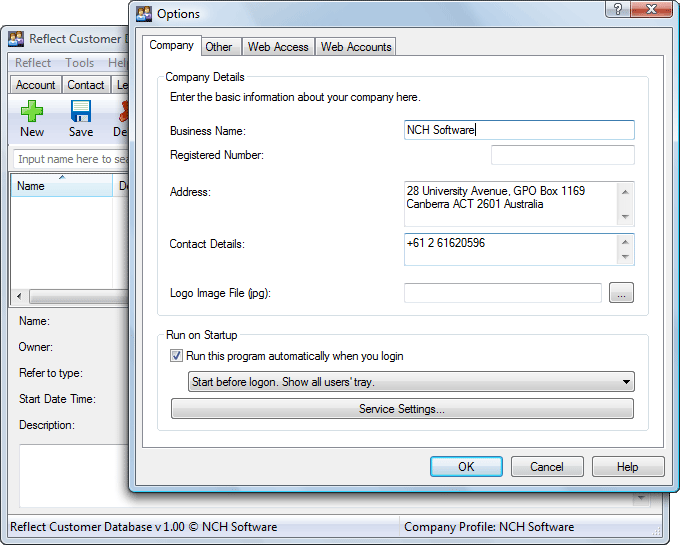
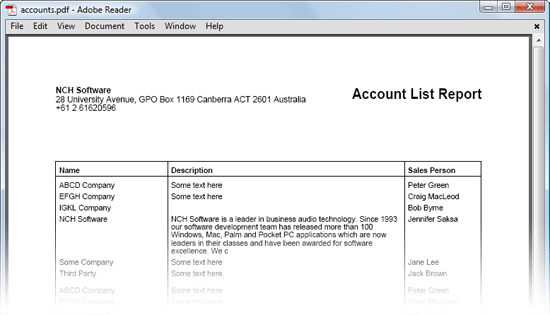
Reflect free customer relationship management software screenshots
Customer Database Software Features
  • Manage unlimited tasks, notes and events for
    each of your clients
  • Set reminders for events, such as phone calls or meetings
  • Easily filter data to generate customer reports
  • Print, fax, email or export reports to PDF
  • Web access mode enables mobile access and
    multiple users
  • Import customer information from your Outlook contacts or other databases
  • Install and run customer relationship software in less than 60 seconds
  • Run multiple businesses from one installation of Reflect CRM Software 
Download Reflect CRM Software

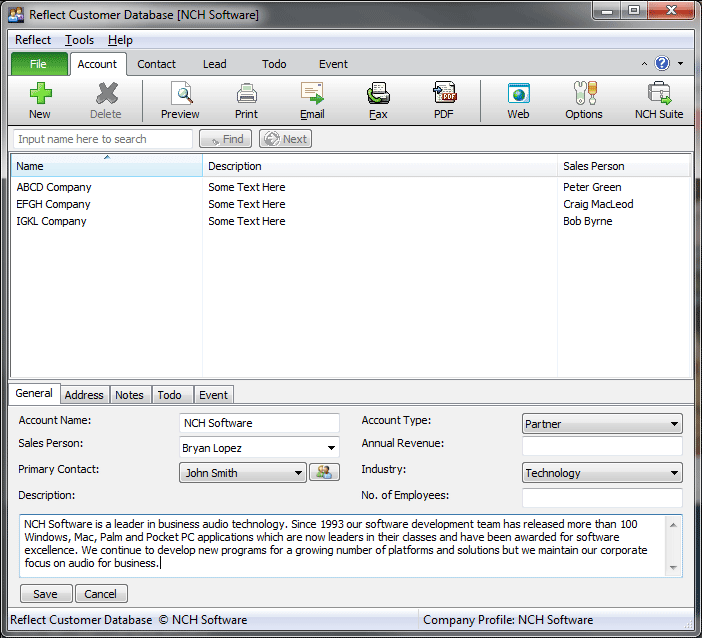
    See more customer database screenshots Below:
    entirely free, and can be installed and running in less than 60 seconds.


    Like what you see?

    Download Reflect here: Download Now
    Reflect CRM Software allows businesses to easily track customer information and interactions, record notes, tasks and events.

    Download Reflect CRM Software


    CardWorks Business Card Software

    Design your own printable business cards
    Easy business card design software to make your own business cards.
    • Create and print your own business cards
    • Select from a wide range of business card templates
    • Change template color schemes for additional customization
    With an extensive range of business card templates, CardWorks makes it easy to design business cards to fit your personal or corporate brand image, giving your customers and business contacts easy access to your contact information.
    Download CardWorks Business Card Creator Software

      Business Card Software Features
      • Wide selection of business card templates included
      • Download additional free business card template designs
      • Adjust template color schemes
      • All standard business card and paper sizes supported
      • Create single- or double-sided business cards
      • Store names and addresses for multiple businesses
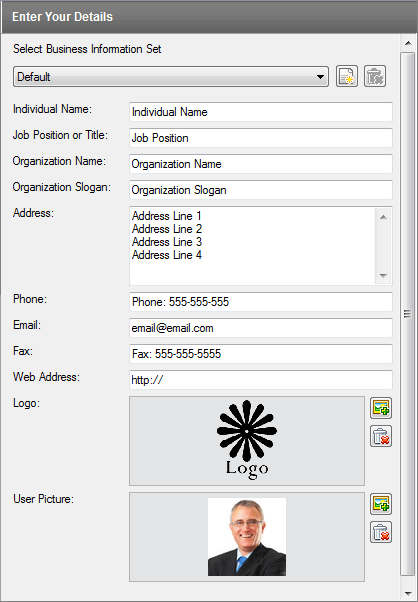
      • Add a company logo, employee photo or other user picture (supports many formats including jpg, gif, tiff, bmp and png)
      • Templates include bleed to ensure colors go all the way to the edge of the card when cut
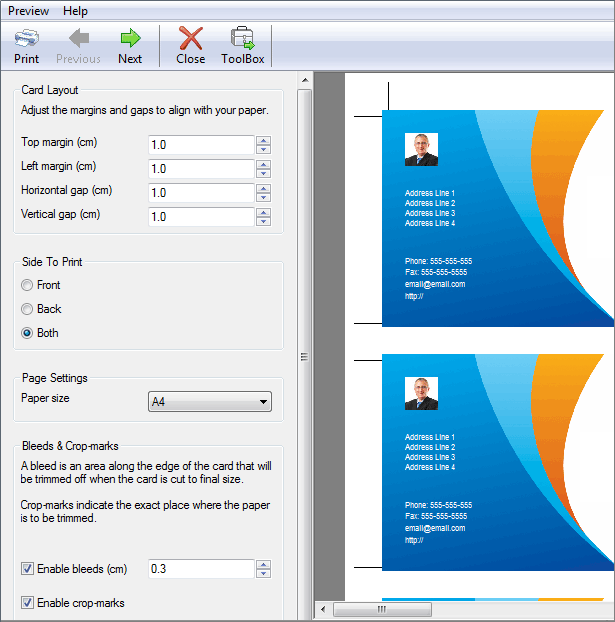
      • Print with crop marks to easily trim cards to size
      • Export to a high resolution PDF and take to a printer 
      See Business Card Software Screenshots Below  :

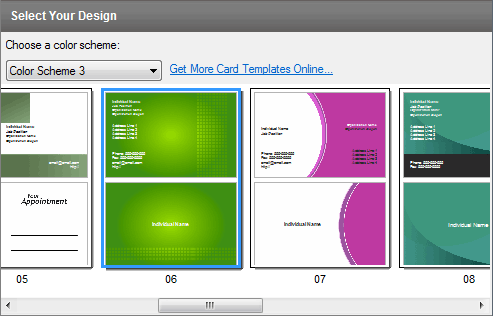
      Select your unique style

      Choose from the business card templates that come with CardWorks


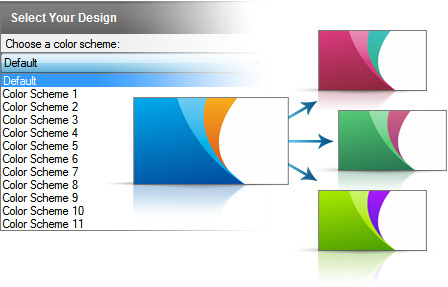
      Change the template color scheme

      Use the color scheme dropdown menu to pick a color scheme that best fits your branding style and logo.

      Fill in your details quickly and easily


      Print or export to PDF

      Print your business cards staight from the application, or save as a PDF document and take your design to a printer.

      Like what you see?

      Download CardWorks here: Download Now
      Create professional, high quality business cards in minutes with CardWorks. Simply download now and install now to start exploring the endless design posibilities.
      Download CardWorks Business Card Designer Software
       

      Copper Point of Sales Software

      Copper point of sale software (POS) provides businesses with a cash register system that stores product information, making the checkout process quicker and more accurate for your customers and your records.
      • Easily record sales transactions
      • Print receipts for customers
      • Manage product pricing and discounts
      Copper point of sale software is easy to navigate, and is compatible with touch screen terminals and barcode scanners, helping save time when ringing up sales and preventing cashier errors. 
      Download Copper Point of Sale Software

      System Requirements
      • Works on Windows XP, Vista, Windows 7 and 8
      • Mac OS X 10.4 or above
      Download Copper Point of Sales Software

      Point of Sale Software Features
      • Records sales transactions quickly and easily
      • Generates and prints professional looking receipts
      • Supports receipt printers that use roll paper
      • Works with touch screen terminals and barcode scanners eliminating the need for mouse or keyboard input
      • Manages item pricing and offered discounts
      • Reports to analyze sales by salesperson or by item
      • Integrates with Inventoria to maintain inventory data and quantities across all aspects of your business
      • Data backup/restore feature to keep data safe
      • Installs and ready for printing in less than a minute
      • Designed to be very easy to use for day-to-day operation
      Multiple Payment Types

      Multiple Payment Methods

      Accept cash, checks, credit cards or even multiple payment types on any transaction.
      Easily Apply Discounts and Coupons

      Discounts and Coupons

      Store coupons and promotions can be easily applied to individual items or entire purchases.
      Print Multiple Sized Receipts

      Print Receipts in Multiple Sizes

      Customize your receipts and print on either a regular page or on receipt roll paper.
      Manage Customer Returns, Refunds and Exchanges

      Refunds and Returns

      Process refunds and print updated receipts in just a few steps.

      See Screenshot Below:
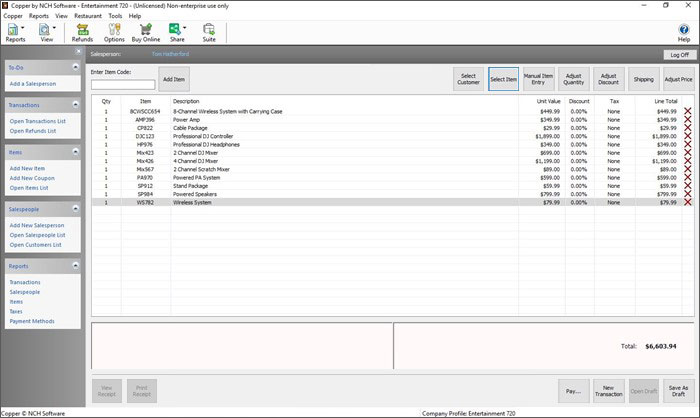
      Main Window
      Create transactions, process refunds, add items, manage salespeople, and run reports.


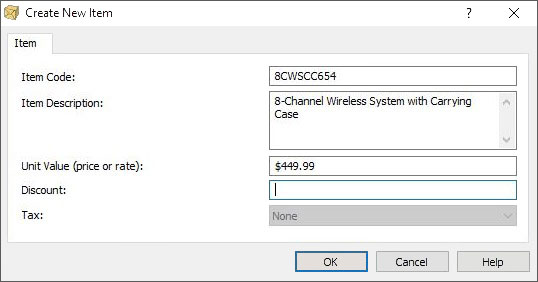
      Add Items
      Enter the items you sell, along with the prices and taxes.


      Manage Sales Staff
      Add salespersons, manage user privileges and passwords.


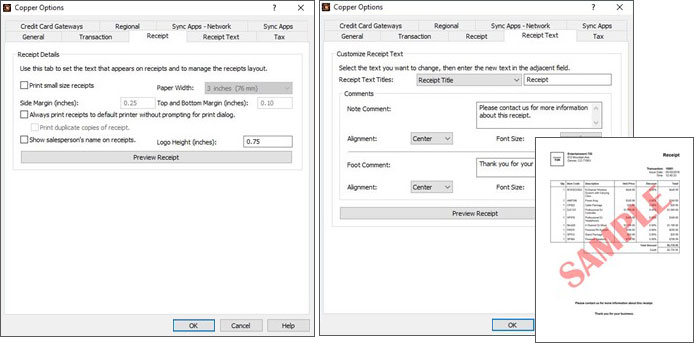
      Customize Receipts
      Choose the receipt size, change receipt headings, and adjust printing positions.


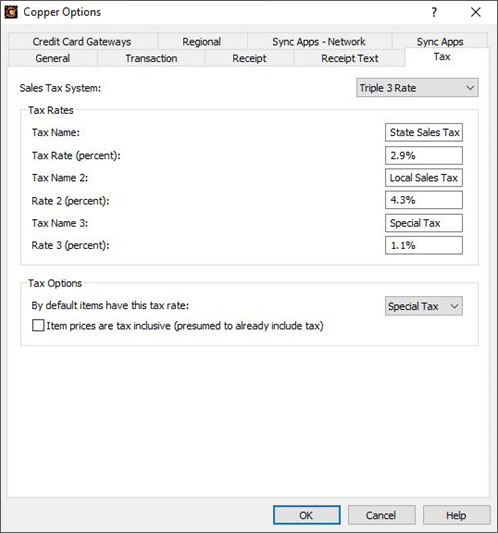
      Manage Tax Rates
      You can specify multiple sales taxes.


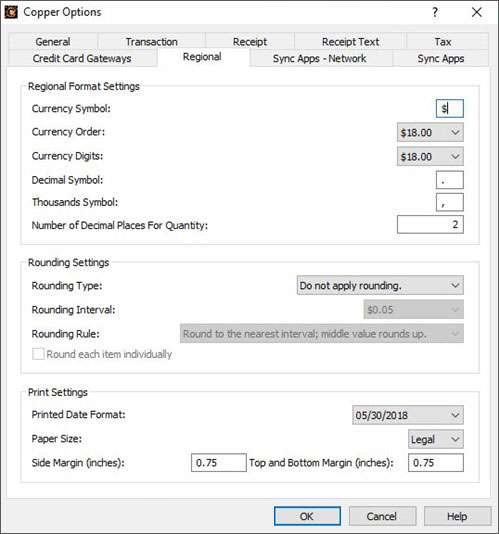
      Set Regional Options
      Select currency options, date formats, and adjust rounding of transactions.


      Like what you see?

      Download Copper here: Download Now
      Easily record sales transactions, print customer receipts and manage product pricing, discounts and promotions, streamline the retail checkout process, save time and ensure accuracy.
      Click here to Download Copper

      MoneyLine Personal Finance Software

      Easy Home Accounting and Checkbook Software MoneyLine personal finance software tracks all your money, bank accounts and spending in one place, so you stay organized and in control of your finances.


      • Keep track of your spending
      • Monitor bank account balances
      • Categorize purchase transactions
      • Easy budgeting tools


      Personal finance software gives you fast and easy access to all your important spending and financial data in one place to help you manage your spending and digitally balance your checkbook.
      Download MoneyLine today to begin tracking your income, savings, and expenses. 
      System Requirements
      • Works on Windows XP, Vista, Windows 7 and 8
      • Mac OS X 10.4.4 or above
      Download MoneyLine Personal Finance Software
      Download Personal Accounting Software


      Personal Financing Features
      • Checkbook register for all your personal accounts, including savings and checking accounts
      • Add and track additional accounts, including credit cards
      • Categorize transaction types and set budgets to manage finances and track spending
      • Split transactions across multiple categories
      • Schedule recurring transactions like paychecks and mortgage payments
      • Download transactions directly from your bank
      • Reconcile your purchases and transactions against your bank statement
      • Track transfers between accounts
      • Report on income and expenses by category and payee to help manage and track your spending
      • Budget Wizard makes taking control of your finances easy

      Inventoria Inventory Software

      Business Inventory Management and Stock Control
      Manage and monitor your inventory with Inventoria to help streamline your operations and boost profits.


      • Easily organize and keep track of inventory
      • Never run out of stock with warnings and reports
      • Cloud access feature lets staff access remotely
      • Installs and is running in just minutes


      Inventoria is designed to be as intuitive to use as possible, so after a quick installation, you’ll be streamlining your inventory processes within minutes.
      System Requirements
      • Works on Windows XP, Vista, Windows 7 and 8
      • Mac OS X 10.4 or above
      Download Inventoria Inventory Software
        * During installation of this download you will be given the option to install Google® Chrome and closely related programs from the NCH Software suite. These are optional and you can select what you want depending on your requirements.
        Purchase Inventoria Stock Manager

        Ordering and Receiving
        • Create purchase orders and email directly to vendors
        • Maintain a database of customers and suppliers
        • Set low-level warnings so you know when to reorder
        • Update item quantities when orders are received
        Inventory Reporting
        • Monitor and report stock levels, costs and averages
        • View inventory levels by location, category or overall
        • Product history shows when items were received or sold
        Item Control
        • Import current inventory with a .csv file
        • Scan in barcodes to add new items
        • Add notes, URLs and photos to item descriptions
        • Group items into categories for organized stock control
        • Set sales units for items sold by weight or in bundles
        • Integrates with other business programs to maintain inventory data across all aspects of your business
        Manage Users and Locations
        • Transfer stock between locations
        • Web access allows users in different locations to log in
        • Assign appropriate access levels to different users
        • Mobile access to the program through the web interface
          (e.g., iPhone, Android)
        • Manage multiple businesses simultaneously

        Express Accounts Accounting Software

        Accounts and bookkeeping program for business Express Accounts is professional business accounting software, perfect for small businesses needing to document and report on incoming and outgoing cash flow including sales, receipts, payments and purchases. 
        • Easily track payments and deposit transactions
        • View balances and reports to see how your business is doing
        • Email or fax reports directly to your accountant
        Designed to be very easy and intuitive to use, this accounting software will have you up and running within minutes. Simply download now and install to get started with your business bookkeeping.

        Organize your Bookkeeping

        Stay organized, tracking accounts receivable, accounts payable, detailed customer and vendor details and more
        See how your company is doing with over 20 financial reports
        Double-entry book keeping, journal entries posted automatically

        Sales and Accounts Receivable
        • Track sales and accounts receivable
        • Automatically record recurring orders and invoices
        • Accounts receivable & reports update as invoices are paid
        • Generate professional quotes, sales orders and invoices
        Financial Analysis and Reports
        • Easily generate over 20 essential financial reports at any time
        • Income Statement (Profit & Loss statement) shows how your business has performed
        • Balance Sheet shows your current assets and liabilities
        • Analyze sales by customer, salesperson or item
        • Financial reports help prepare your tax returns quickly
        Accounts Payable
        • Manage accounts payable and pay bills
        • Track outgoing payment and purchasing transactions
        • Generate purchase orders
        • Create and print checks
        Additional Accounting Features
        • Multiple users with web access within the organization securely log on and use the program over the network or even the internet
        • Secure mobile access to the program through the web interface (e.g., iPhone, Android)
        • Integrates with Inventoria to maintain inventory data across all aspects of your business
        • Run multiple businesses with a single installation, even businesses operating with different currencies
        • Automatic integrated backup 
        Accounting & Bookkeeping Screenshots Below:
        Quickly create quotes or invoices for customers and record the transaction in Accounts Receivable.

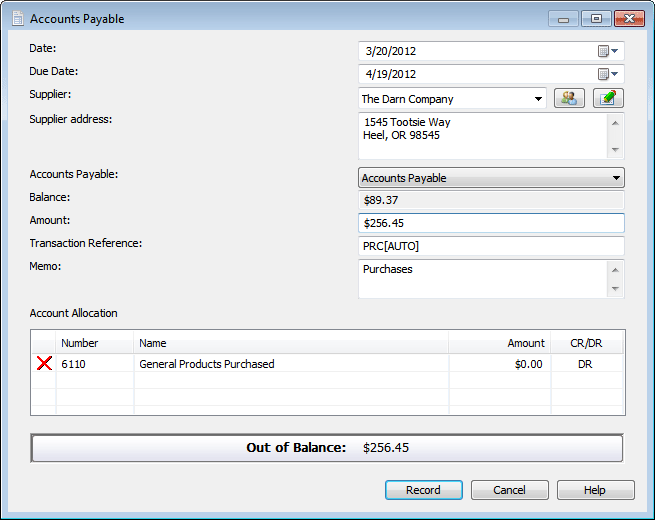
        Accounts Payable
        Track the bills your company owes by entering them into Accounts Payable.


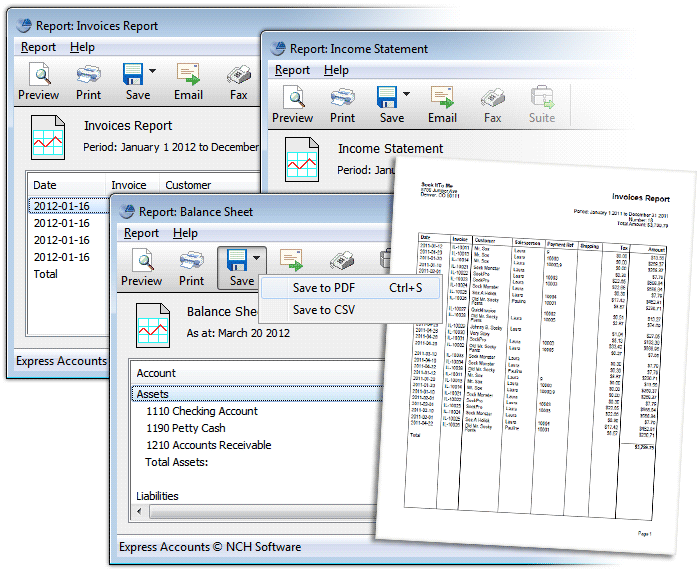
        Reports
        Quickly generate more than 20 financial reports to see how your business is performing.


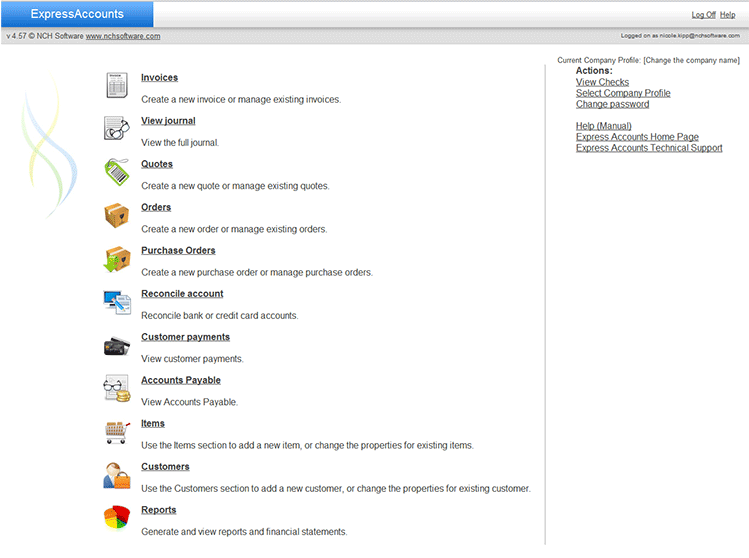
        Web Interface
        Use the Web Access feature to allow multiple users, and to securely access your accounting information when you're away from the office.


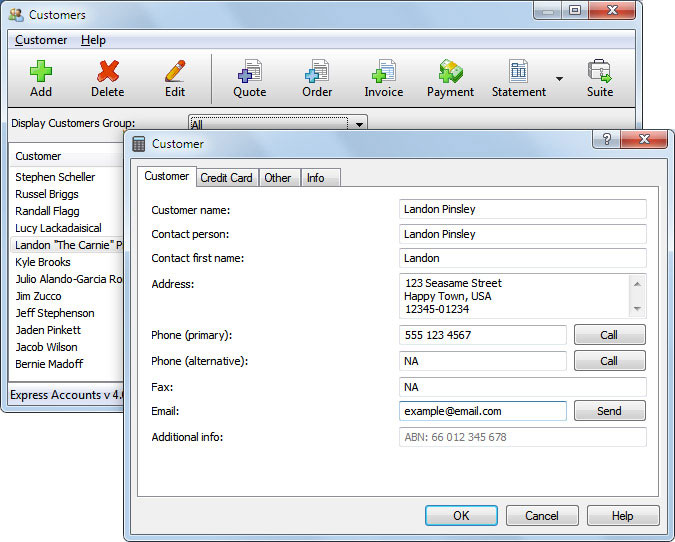
        Store Customer and Vendor Details
        Store information about customers and vendors, including contact information, billing addresses, and special notes. Stored details can be easily accessed and will save you time when entering new orders and transactions.


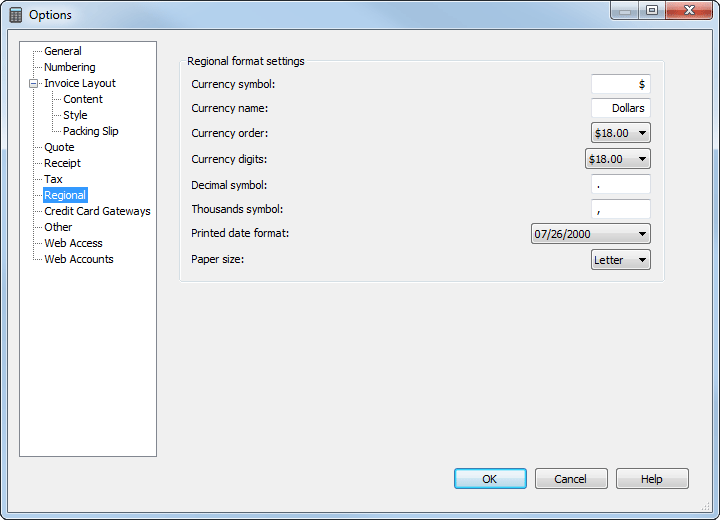
        Options
        Regional settings allow you to specify your currency and how it's displayed. Also, update company information, tax rates, and user accounts for the Web Access feature through the Express Accounts Options.


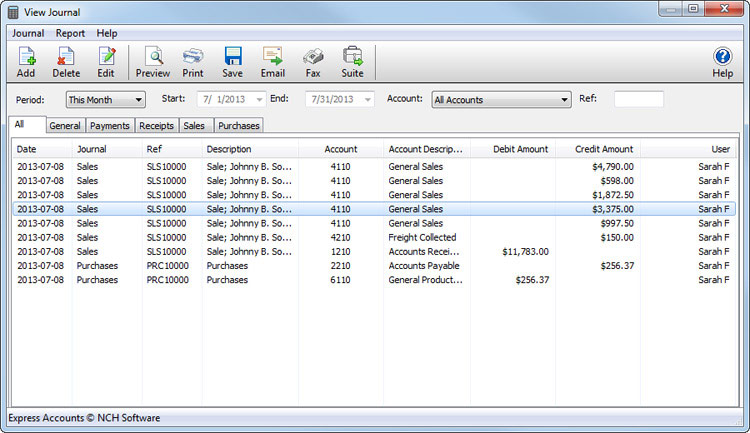
        Journal
        The Journal tracks all your transactions, and allows you to filter by type of transaction.


        Like what you see?

        Download Express Accounts here: Download Now
        Express Accounts is a professional accounting application for Windows and Mac that allows you to track and report on incoming and outgoing cash flow including sales, receipts, payments and purchases for a single or multiple companies.
        Click here to Download Express Accounts Accounting Simplicity

        Express Invoice Invoicing Software

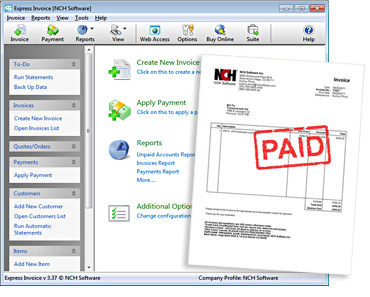
        The easiest and most complete invoicing system Easy invoicing software to manage and track your billing on Mac or Windows. 
        • Create invoices, quotes and orders quickly
        • Automate recurring invoices and templates
        • Easily add multiple users and enable remote access
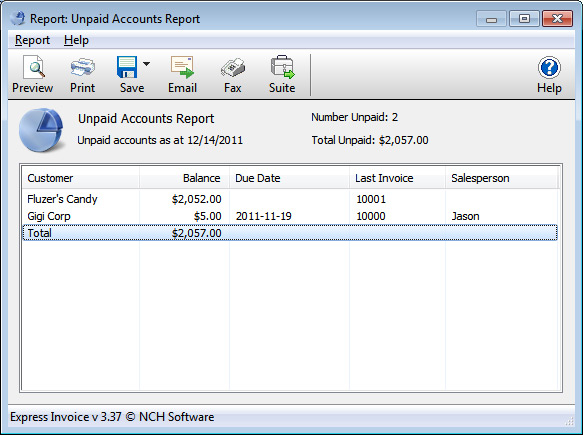
        Express Invoice lets you create invoices you can print, email or fax directly to clients for faster payment. The reporting functionality allows you to keep track of payments, overdue accounts, sales team performance and more.
        Download Express Invoice for Windows Download Express Invoice for Windows
        Purchase Express Invoice online here

        Streamline your billing process and support multiple tax rates for multiple businesses—all with secure mobile access to iPhone and Android devices. Compatible with Windows and Mac, Express Invoice is available for download today.
        Download billing and invoice software

        Invoicing Software Features
        • Easily create invoices, quotes and orders
        • Customize invoices including logo, heading text, notes and more
        • Save or send invoices as PDF files
        • Email or fax directly from the application
        • Schedule recurring invoices
        • Automatically send statements to customers with overdue payments
        • Supports multiple tax rates for countries where required (e.g., Canada)
        • Supports invoicing for multiple businesses
          (e.g., iPhone, Android)
        • Web access lets multiple users within the organization securely log in and use over the network or even the Internet
        • Secure, mobile access through the web interface (e.g., iPhone, Android)
        • Reporting includes accounting, salesperson performance, unpaid invoices and more
        • Integrates with Inventoria to maintain inventory data across all aspects of your business 
        See Here Invoicing Software Screenshot:

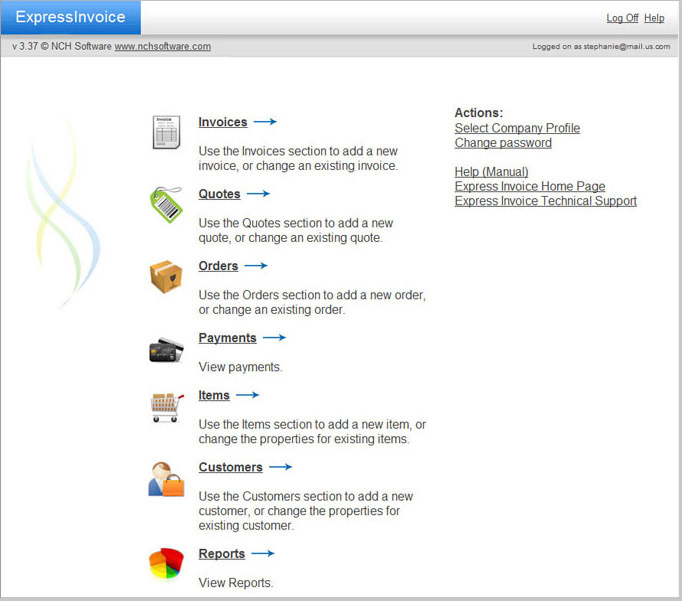
        Main Web Console


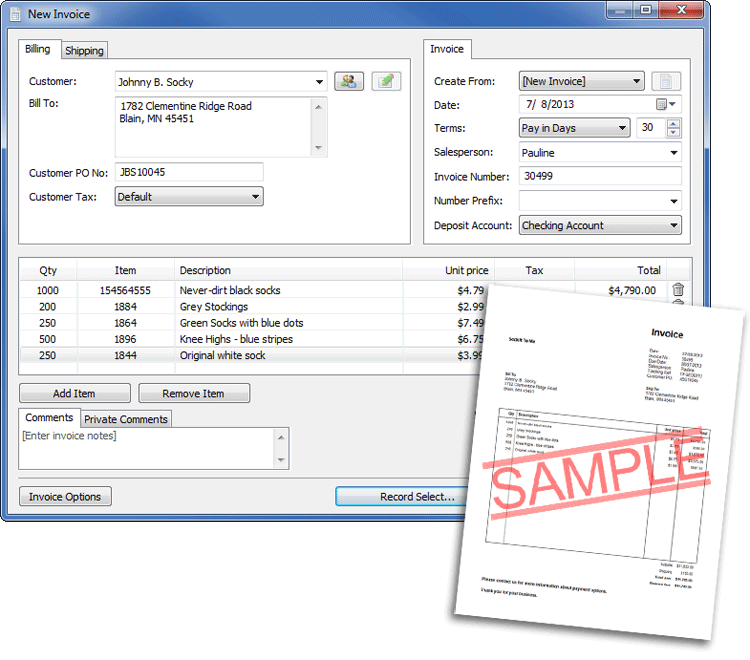
        Create a New Invoice


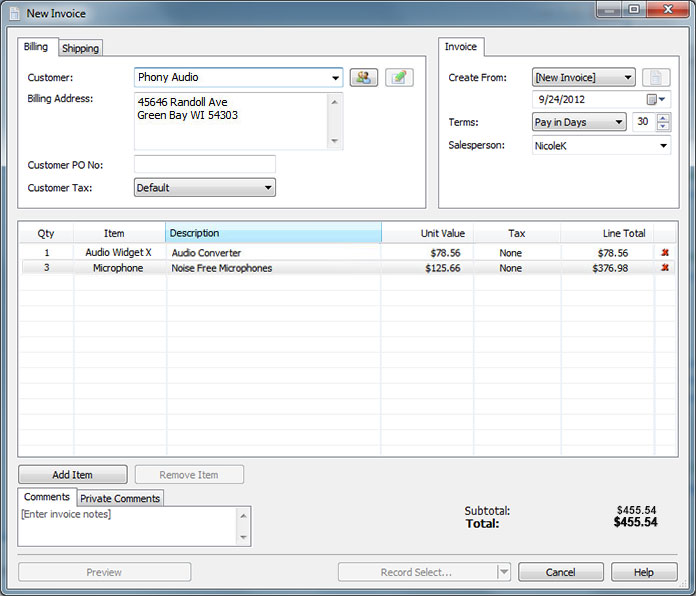
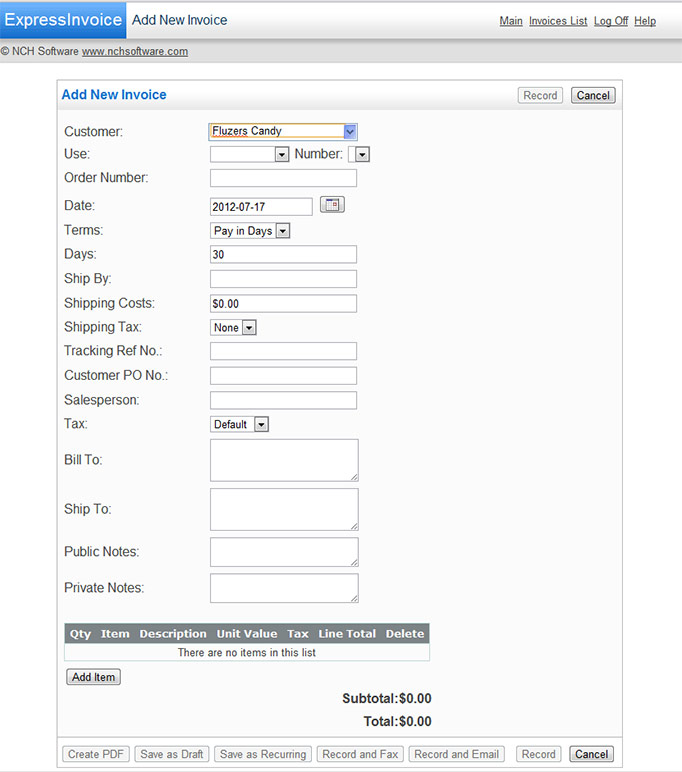
        Create new invoices from the Express Invoice application directly or through the Web Access mode.


        Web Access
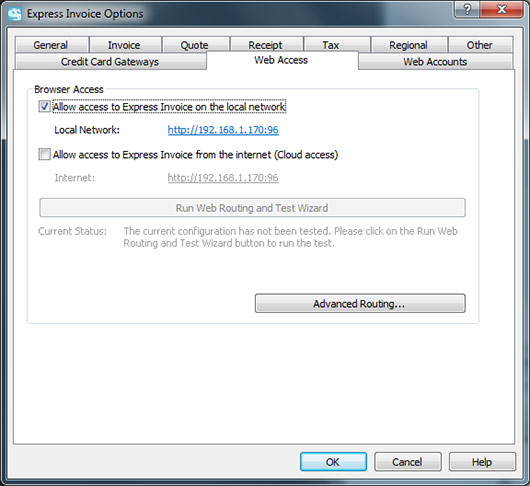
        Setting up Web Access to Express Invoice's data files is simple. In the Options dialog, simply select to enable Web Access and then in the next tab (Web Accounts) set up user accounts with Administrator, User or Reporting access.


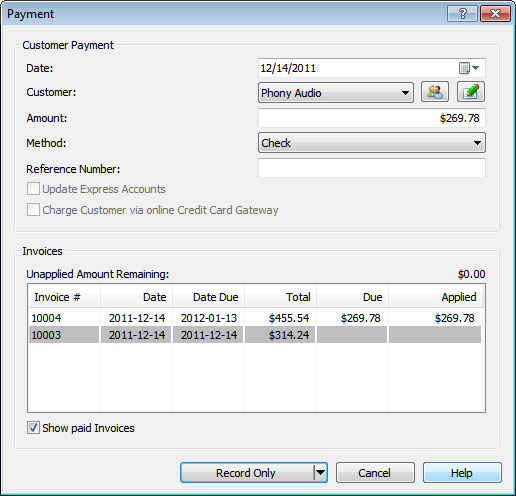
        Apply Payments


        Keep Track of your Customers


        View and Print Reports

        Like what you see?

        Download Express Invoice here:  
        Download Now

        Express Invoice allows you to quickly and easily create invoices. It also allows you to manage client accounts, apply payments, generate reports, and more.
        Click here to Express Invoice Professional Invoicing Software